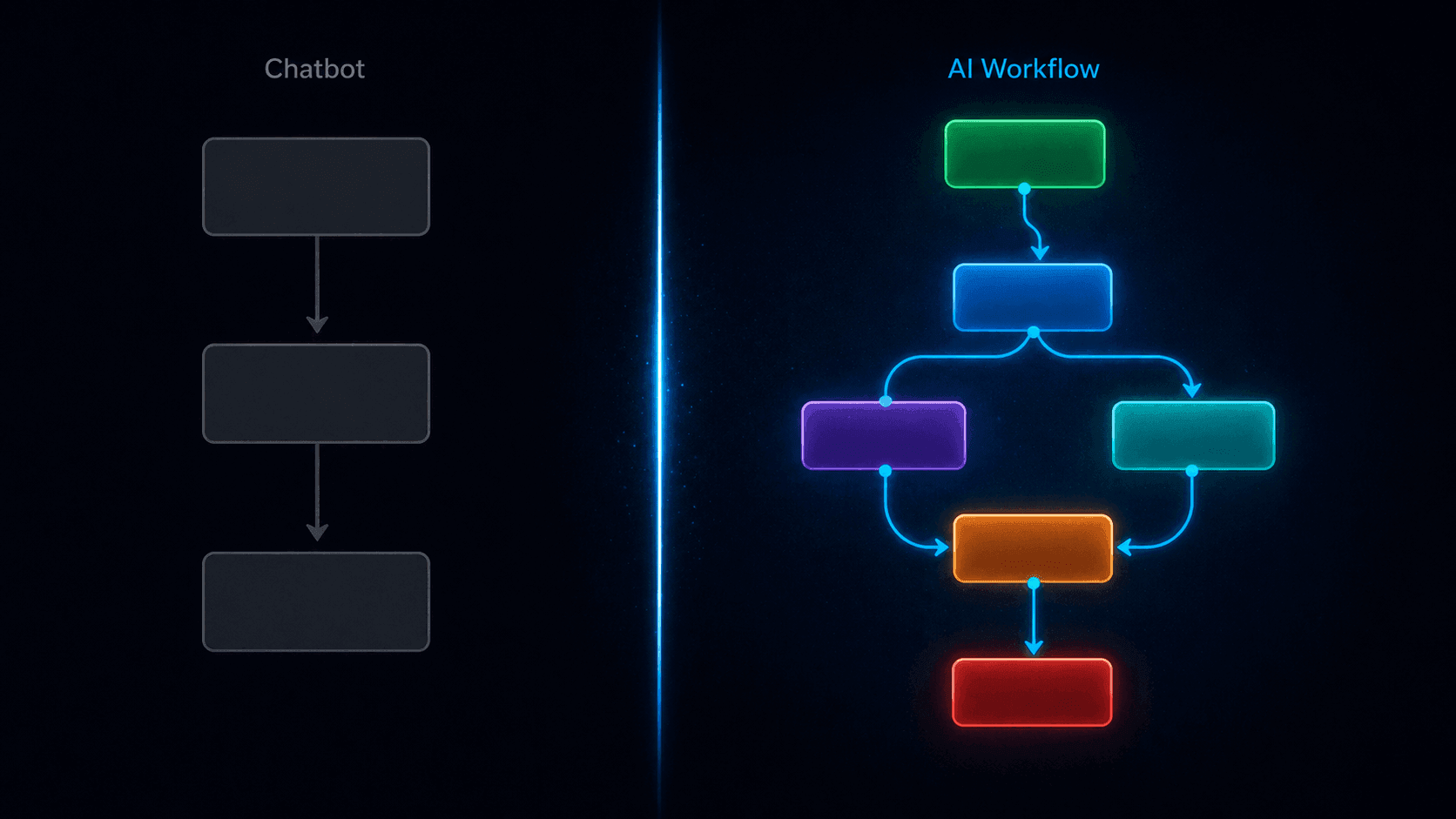
When people ask me "do you use a chatbot?" I never quite know how to answer.
Technically, yes. There's a chat interface on the website. Visitors open it, type messages, get responses. In the broadest definition of the word, that's a chatbot.
But what's actually happening underneath is something fundamentally different from what most people mean when they say chatbot. There's no script. There's no decision tree someone built in 2019 that's still limping along. There's no "press 1 for billing, press 2 for support" logic dressed up in text form.
There's a workflow — a structured sequence of intelligent nodes that detects intent, branches based on context, collects data through embedded forms, fires notifications to external tools, and logs everything for review. The chat interface is just how users interact with it. The workflow is what actually runs.
That distinction — chatbot vs. AI workflow — is the most important concept to understand before you decide how to automate any part of your customer-facing website. Because they produce completely different outcomes, cost different amounts to maintain, and fail in completely different ways.
Let me break it down properly.
What a Traditional Chatbot Actually Is
A traditional chatbot — and there are still millions of them running on websites right now — is fundamentally a decision tree.
Someone built it by anticipating every question a visitor might ask, writing a response to each one, and connecting them with if/then logic. "If the user says X, show response Y. If they say Z, show response W. If none of the above, show the fallback message."
This works reasonably well for a narrow, predictable set of interactions. A pizza ordering bot. A flight status checker. An appointment reminder system. Use cases where the possible inputs are limited and the desired outputs are defined.
It breaks down immediately when:
- Users phrase things in ways the builder didn't anticipate
- The conversation needs to branch based on nuanced context, not just keyword matching
- You need to actually do something with the information — not just respond to it
- The business changes and nobody updates the decision tree
The symptom is familiar to anyone who's used a bad chatbot: the circular conversation that keeps showing the same unhelpful options, the "I didn't understand that" dead end, the "please call us during business hours" that defeats the entire purpose of having an automated system.
A traditional chatbot is static logic pretending to be intelligence.
What an AI Workflow Actually Is
An AI workflow is architecturally different in three fundamental ways.
First: the intelligence is real, not simulated. Instead of matching user input to a predefined response, an AI workflow uses a large language model — GPT-4o, GPT-4o-mini, or similar — to genuinely understand what the user is saying, in whatever phrasing they use, and generate a contextually appropriate response. The AI reads intent. It doesn't match keywords.
Second: the structure is explicit. Rather than everything living in one monolithic decision tree, an AI workflow is a chain of specialised nodes — each one doing a specific job. An Agent Node handles AI conversations. A Condition Node handles branching logic. A Form Node handles structured data collection. An Action Node handles external integrations. A Static Message Node handles fixed, consistent messages. Each node is configurable, testable, and replaceable independently.
Third: it connects to the rest of your business. A traditional chatbot is self-contained — it has a conversation and stops. An AI workflow has Action Nodes that fire Slack messages, send emails, make API calls to your CRM, create Zendesk tickets, or trigger any REST endpoint. The conversation produces outcomes in your actual business systems, not just a chat log.
In Monology's terms, the documentation captures this precisely: "Workflows define the logic → Widgets deploy the interface → Conversations capture interactions."
The widget — the chat bubble on your website — is the smallest part of the system. The workflow is the substance.
The Node-by-Node Breakdown: What Each Part Does
To make this concrete, let me walk through every node type in a Monology workflow and explain what role it plays — and why that role matters for the chatbot vs. AI workflow distinction.
Start Node — The Entry Point
Every workflow begins here. The Start Node has two jobs: it fires an Auto Reply greeting the moment a visitor opens the chat (without waiting for them to type first), and it sets the initial instruction — a system prompt that tells the AI how to behave from the first message.
In a traditional chatbot, the opening message is a fixed string: "Hi! How can I help you today?" Everyone sees the same thing. In a Start Node, the Auto Reply instruction tells the AI what kind of greeting to generate — warm, concise, contextually appropriate to your business — and the AI produces it naturally each time.
Small difference in isolation. Significant in effect: the first message a visitor receives sets the entire tone of the interaction.
Agent Node — Where Intelligence Lives
This is the core of what separates an AI workflow from a traditional chatbot. The Agent Node is an AI-powered processing unit that connects to a large language model, accesses your knowledge base, uses specialised tools, and produces structured outputs — all in response to a single user message.
Configure it with:
- Your LLM credentials — your own OpenAI or Azure OpenAI API key. You own the model connection. Monology doesn't sit between you and OpenAI in a way that obscures your costs or touches your data opaquely.
- A system prompt — the personality, role, constraints, and behavioural rules for the AI in this node. Not a script. Instructions to an intelligent agent.
- A knowledge base — PDFs, CSVs, or website URLs that the Agent Node draws from when answering questions. The AI responds from your actual content, not from general internet knowledge.
- Tools — specialised capabilities attached to the Agent Node. The IT Services Intent Classifier, for example, is a dedicated DistilBERT-based classification model that identifies visitor intent — Requirement Submission, General Query, Job Application Submission, and four others — with approximately 95% accuracy, without consuming LLM tokens for the classification step itself.
- A Response Model — structured output fields that the Agent Node populates alongside its conversational response. Define a field called
visitor_intentas a string, and the Agent Node extracts and stores it as a named variable that downstream nodes can reference.
That last point — the Response Model — is what makes the Condition Node powerful. Without structured outputs, you'd be trying to build branching logic against free-text AI responses. With structured outputs, you have clean named variables to evaluate.
Condition Node — The Decision Layer
The Condition Node evaluates data from previous nodes and routes the conversation down different paths based on whether conditions are true or false.
It's not a traditional if/then decision tree — it's an evaluation layer that operates on the outputs of intelligent upstream nodes. The difference is what it's evaluating: not a user's raw text (fragile, easily broken by phrasing variation) but a classified, structured output from the Agent Node (stable, consistent, 95% accurate).
A single Condition Node evaluates one question:
- Does
visitor_intentequalRequirement Submission? TRUE → client path. FALSE → other paths.
Conditions support all standard operators: equals, not equals, greater than, less than, greater than equals, less than equals, modulus equals zero, modulus not equals zero. AND/OR logic lets you combine multiple conditions:
visitor_intent equals "Requirement Submission" OR visitor_intent equals "Contact Details"→ capture as leadurgency_level greater than 8 AND plan_tier equals "enterprise"→ escalate to senior team immediately
Chained Condition Nodes — one evaluating the first branch, another evaluating sub-branches from the FALSE path — create sophisticated multi-way routing without any of the fragility of a keyword-matching decision tree.
Form Node — Structured Data Collection In-Conversation
This is one of the capabilities that most clearly separates an AI workflow from a chatbot. The Form Node renders a native form inside the conversation — not a link to an external page, not a sequence of AI messages pretending to be a form, but an actual embedded form with typed fields, validation, and submission handling.
Supported field types: text, email, number, phone, file upload, checkbox, dropdown, radio buttons, toggle switches, and star ratings.
When the form is submitted, every field value becomes a dynamic variable — {{form.name}}, {{form.email}}, {{form.company}} — available to every downstream node in the workflow. The Action Node uses these variables to populate Slack messages and email notifications. The Static Message Node uses them to personalise confirmations. The Conversation log stores them as structured, searchable data.
This is the difference between a chatbot that has a conversation and a workflow that captures structured data from a conversation. One produces a chat log. The other produces a CRM-ready lead record.
Static Message Node — Consistency Where It Counts
Not everything in a conversation needs to be AI-generated. Confirmations, transitions, instructions, goodbyes — these should be consistent, instant, and free of the variability that comes with LLM generation.
The Static Message Node sends a pre-configured message, optionally personalised with dynamic variables from previous nodes. It consumes no LLM tokens. It responds instantaneously. It delivers the exact same message every time.
Use it for:
- Pre-form instructions: "Let me grab a few details — this takes about 60 seconds."
- Post-form confirmations: "Thanks, {{form.name}}! We'll be in touch at {{form.email}} within a few hours."
- Transition messages between workflow stages
- Fallback responses on paths where you want predictable, controlled output
- Handoff messages: "I'm connecting you with someone who can help with this directly."
Knowing when to use a Static Message Node versus an Agent Node is one of the most important design decisions in building a good AI workflow. Agent Nodes for intelligence. Static Message Nodes for consistency.
Action Node — Connecting to the Rest of Your Business
This is where an AI workflow produces real-world outcomes — not just conversation outcomes.
The Action Node supports four action types:
- Send Email — via SMTP, SendGrid, Mailgun, or AWS SES. Fully templated with dynamic variables. Retry on failure. Continue on error.
- Send Slack Message — to a channel or DM. Dynamic variables from form submissions and Agent Node outputs populate the message. Your team gets a fully formatted lead summary the moment a visitor submits their details, regardless of the hour.
- API Call — GET, POST, PUT, PATCH, or DELETE to any REST endpoint. Authentication via Basic Auth, Bearer Token, API Key, or OAuth 2.0. This is the bridge to any external system: your CRM, your ticketing system, your analytics platform, your custom backend. Dynamic variables populate the request body.
- Create Zendesk Ticket — directly from the conversation, with subject, description, priority, type, tags, and custom fields — all populated from conversation data.
Every Action Node has two error handling options: Retry on Failure (automatic retry for transient issues) and Continue on Error (if the action fails, the workflow and the visitor's experience continue uninterrupted). For any customer-facing workflow, Continue on Error should be ON for notification actions — a failed Slack webhook should never break a visitor's experience.
A traditional chatbot has no equivalent to the Action Node. It has conversations. The AI workflow has conversations and consequences — structured outputs that flow into the rest of your business stack.
End Node — Deployment and Sharing
Every path through a workflow terminates at the End Node. But the End Node isn't just a termination point — it's also where you deploy. Click the End Node to create a Widget directly from the workflow builder, automatically attached to the current workflow. Configure appearance, token limits, origin whitelisting, and embedding options. Generate a permanent shareable link or a time-limited temporary link for specific use cases.
The fact that the Widget is created and attached from the End Node — not managed separately — reflects the architectural coherence of the system: the workflow is the primary object. The widget is how people access it.
The Practical Difference: Two Scenarios
Abstract explanations only go so far. Let me show you the same business problem handled two ways.
The scenario: An IT services company gets 200 website enquiries per month. 60% are potential client leads. 30% are job applicants. 10% are general questions. They want to handle all three automatically, capture lead data, notify the sales team, and ensure applicants get a proper response.
With a Traditional Chatbot:
The builder creates a menu: "Are you a (1) potential client, (2) job applicant, or (3) something else?" Visitors who don't read carefully pick the wrong option. Visitors who type a message instead of choosing a number get the fallback. Job applicants who are also interested in services don't fit either category cleanly.
When someone does select "potential client," the chatbot asks a sequence of questions — one at a time, through chat messages — and tries to store the answers. There's no actual form, so validation is unreliable. The data goes into a chat log. Someone on the team has to read the log and manually enter the information into the CRM.
There's no Slack notification. There's no email. There's no Zendesk ticket. The conversation happened and stopped.
With a Monology AI Workflow:
The Start Node greets every visitor with an AI-generated, warm opening. The Agent Node — with the IT Services Intent Classifier tool active — reads their first message and classifies their intent with 95% accuracy, storing it in the visitor_intent Response Model field. The visitor doesn't choose from a menu. They type naturally. The workflow understands.
The Condition Node evaluates visitor_intent. Requirement Submission → client path. Job Application Submission → applicant path. General Query → knowledge base agent path.
On the client path: a Static Message Node sets expectations, then the Form Node renders the lead capture form. The visitor fills in name, email, company, and project description. They submit.
The Action Node fires: a Slack message to #leads with all form data and the classified intent. Simultaneously, a second Action Node fires an email to the sales team with the same data formatted as an email brief. The Zendesk Action Node creates a ticket tagged "website-lead" with priority set to Normal.
A final Static Message Node confirms to the visitor: "Thanks, {{form.name}} — we'll be in touch at {{form.email}} shortly."
The whole interaction took three minutes. The sales team has a fully populated lead record waiting for them before the visitor even closes the browser tab. The conversation is logged in Monology's Conversations section with the visitor's device, location, referrer URL, and complete message history.
Same scenario. Completely different system. Completely different outcomes.
Why the Distinction Matters for Your Business Decision
If you're evaluating whether to add a chatbot to your website, the chatbot vs. AI workflow distinction should shape your entire decision.
If you want a greeting and basic FAQ responses: a simple chatbot might genuinely be sufficient. If your use case is narrow, predictable, and low-stakes, the overhead of building a full workflow may not be warranted.
If you want to qualify leads: you need an AI workflow. Lead qualification requires understanding intent (Agent Node + Intent Classifier), branching based on that intent (Condition Node), collecting structured data (Form Node), and notifying your team (Action Node). A chatbot can simulate parts of this, but without structured outputs and real integrations, the data stays in the chat log and the work lands back on a human.
If you want to handle mixed traffic — clients and job applicants hitting the same contact point — you need the Intent Classifier tool and multi-path Condition Node routing. This is architecturally impossible in a traditional chatbot without building and maintaining separate entry points for each visitor type.
If you want 24/7 coverage that actually produces business outcomes: you need an AI workflow with Action Nodes. Without integrations, your 24/7 coverage produces chat logs that someone reviews in the morning. With integrations, it produces Slack notifications, email briefs, and CRM records — before you're awake.
If you want to understand what's happening: you need the Conversations section and Dashboard. Every conversation in Monology is logged with complete context — messages, form data, device, location, referrer, duration, nodes traversed. A traditional chatbot gives you conversation transcripts. Monology gives you structured, filterable, analysable data about every interaction.
The Maintenance Reality
One more practical difference that rarely gets discussed: what happens six months after you build it.
A traditional chatbot built on a decision tree requires someone to update every branch whenever anything changes. Update your pricing? Find every node in the tree that mentions pricing and update it. Add a new service? Add new branches. Change your process? Rebuild the relevant paths.
Nobody does this consistently. Within a year, most decision-tree chatbots are partially stale — giving subtly wrong information with complete confidence.
An AI workflow backed by a knowledge base updates differently. When your pricing changes, you update the PDF in the knowledge base. When you add a service, you update the document. The workflow structure — the nodes and their connections — stays the same. Only the content the AI draws from changes.
This is a meaningfully lower maintenance burden, especially for small teams where "update the chatbot" is nobody's primary job.
The Summary
A chatbot is a conversational interface. An AI workflow is a conversational interface built on structured, intelligent, connected nodes — each doing a specific job, composing together into a system that understands intent, collects data, routes intelligently, fires real integrations, and produces business outcomes.
The chat bubble on your website looks the same either way. What's underneath is completely different.
For most real business use cases — lead qualification, mixed traffic routing, 24/7 after-hours coverage, automated notifications, FAQ deflection — an AI workflow built in Monology does what a traditional chatbot cannot: it doesn't just have conversations. It runs your business while you're not watching.
If that's the outcome you're after, the architecture that produces it is a workflow — not a chatbot.
Start your 11-day free trial at monology.io — no credit card required. Build your first AI workflow and feel the difference for yourself.